Written by
Fuma Nama
At
Sun Jun 09 2024
Fumadocs 12
介绍 Fumadocs v12
有什么新鲜事?
🌐 What's New?
Fumadocs v12 主要旨在改进用户界面,优先提升内容和阅读体验。
🌐 Fumadocs v12 mainly aims to improve the UI, prioritizing content and reading experience.
新界面
🌐 New UI
在观察了像 https://turbo.build 这样的大型文档网站后,我发现导航栏占用了屏幕过多的空间,而它只包含指向博客、展示、GitHub 等的链接。它们不一定与文档相关,把它们放在屏幕顶端并不会带来更好的阅读体验。
🌐 After observing large docs sites like https://turbo.build, I found that the navbar took too much space on the screen, while it only contains links to Blog, Showcase, GitHub, etc. They are not necessarily related to the docs, placing them at the top of our screen doesn't bring a better reading experience.
所有这些链接现在都已移到侧边栏,使文档的视图更加简洁、干净。
🌐 All these links are now moved to the sidebar, allowing a clean, minimal view of the docs.
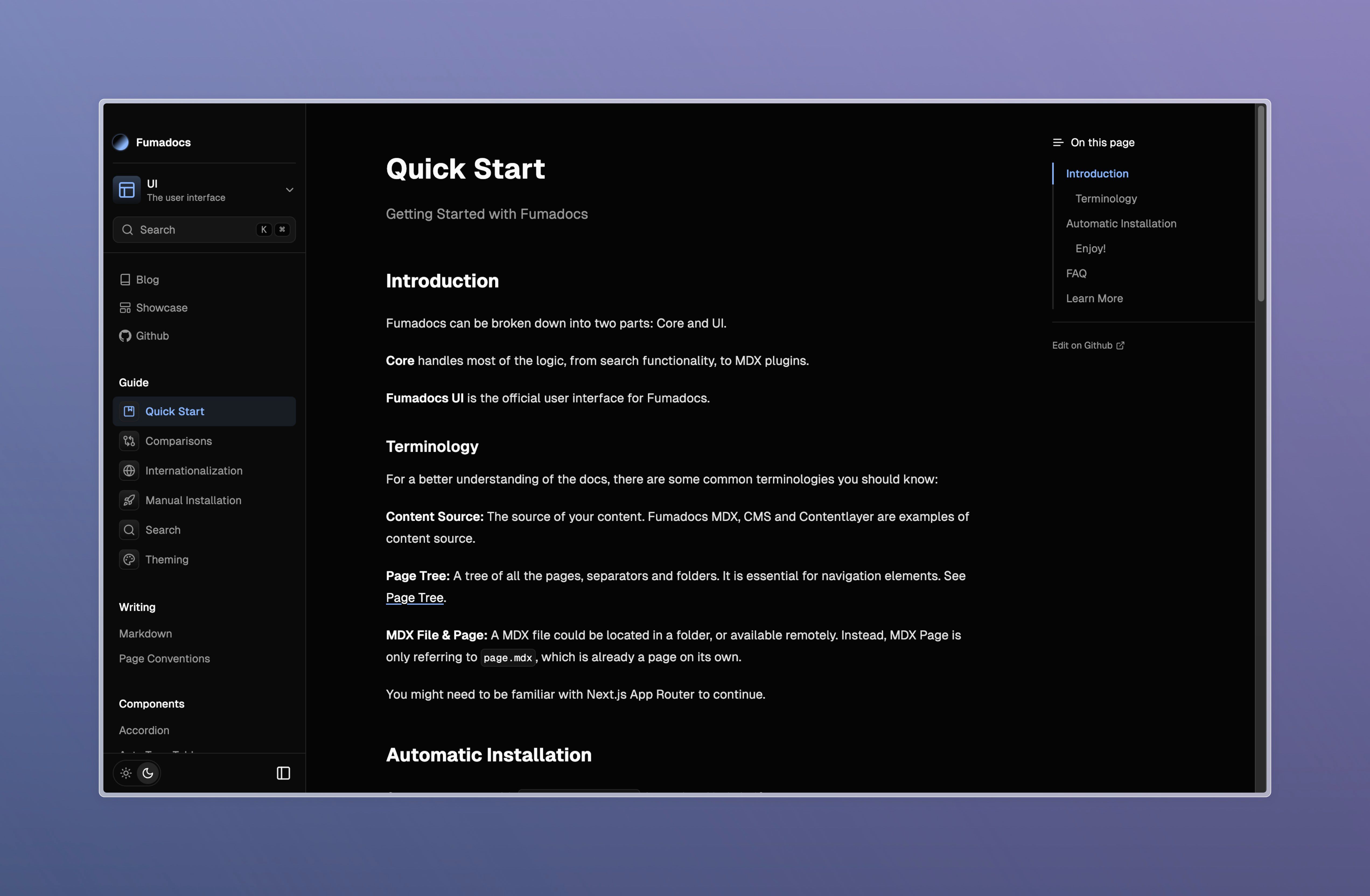
我也注意到,随着内容的增加,文档开始显得杂乱。为了解决这一问题,侧边栏现在默认包含边框和背景。这有助于读者更容易区分导航元素和内容。
🌐 I also noticed the docs start to look messy as your content grows. To ameliorate this, the sidebar now includes a border and background by default. This helps readers to distinguish navigation elements and content easier.
侧边栏将始终位于屏幕左侧,在大型视口上占有更大的空间。
🌐 The sidebar will always be placed at the left of the screen, having a bigger space on large viewports.
我认为新的用户界面仍有改进的空间。欢迎报告界面问题或留下反馈!
🌐 I believe the new UI still has room for improvement. Welcome to report UI issues, or leave feedback!
更好的多页树
🌐 Better Multi Page Trees
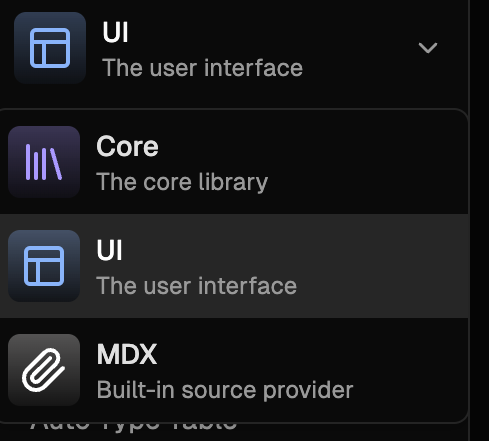
在 Fumadocs 的早期版本中,我们就支持多个页面树。然而,它缺乏适当的说明和配置指南。过去,你需要实现一个导航元素来在页面树之间切换,并将文件夹标记为根文件夹。
🌐 We supported multiple page trees at a very early version of Fumadocs. However, it lacks proper explanations and guides to configure it. In the past, you needed to implement a navigation element to switch between page trees and mark the folder as a root folder.
现在,你可以直接使用 <RootToggle /> 组件,文档对此有更好的解释。
🌐 Now, you can use the <RootToggle /> component directly, and the docs has a better explanation of it.
页面树后处理器
🌐 Page Tree Post Processors
现在,你可以使用 Source API 轻松地为页面树附加属性。
🌐 You can now attach properties to page trees easily with the Source API.
import { loader } from 'fumadocs-core/source';

export const utils = loader({
  pageTree: {
    attachFile(node) {
      // modify the node
      return node;
    },
  },
});
改进的国际化支持
🌐 Improved i18n Support
语言切换功能现已添加到文档布局中。
🌐 The language switch is now added to Docs Layout.
import { DocsLayout } from 'fumadocs-ui/layouts/docs';

export default function Layout({ children }: { children: React.ReactNode }) {
  return <DocsLayout i18n>{children}</DocsLayout>;
}请注意,<LanguageSelect /> 组件现在已被 <LanguageToggle /> 取代,请确保删除对旧组件的引用。
🌐 Note that <LanguageSelect /> component is now replaced by <LanguageToggle />, make sure to remove references to the old component.
突发
🌐 Breaking
用户界面
🌐 UI
从根提供程序中移除已弃用的选项 enableThemeProvider。请改用 theme.enabled。
🌐 Remove deprecated option enableThemeProvider from Root Provider. Use theme.enabled instead.
核心
🌐 Core
从侧边栏组件中移除已弃用的选项 minWidth。请改用 blockScrollingWidth
🌐 Remove deprecated option minWidth from Sidebar component. Use blockScrollingWidth instead
修复
🌐 Fixes
用户界面
🌐 UI
- 修复 twoslash 代码块的问题
- 将排版样式应用于标题
- 支持主题标签的翻译
开放API
🌐 OpenAPI
- 修复无法检测可空类型的问题
核心
🌐 Core
- 备注标题:在标题中支持代码语法
创建 Fumadocs 应用
🌐 Create Fumadocs App
- 添加
layout.config.tsx文件以分享布局选项