Written by
Fuma Nama
At
Thu Sep 19 2024
Fumadocs v14
推出 Fumadocs v14
为什么?
🌐 Why?
受到 Shadcn UI 的一些启发,我决定让 Fumadocs 更易于使用,并提供更多简化设计的 API。
🌐 Taking some inspirations from Shadcn UI, I decided to make Fumadocs easier to use, with more APIs that simplify the design.
这是一次重大更新。
🌐 This is a large update.
新功能
🌐 New Features
Fumadocs 命令行工具
🌐 Fumadocs CLI
将 Fumadocs 的 UI 组件克隆到你的工作区并进行修改。
🌐 Clone Fumadocs UI components to your workspace and modify them.
npm install @fumadocs/cli --save-devpnpm fumadocs add详情请参阅 文档。
🌐 See docs for details.
侧边栏标签
🌐 Sidebar Tabs
之前,多个页面树是通过 Fumadocs UI 的 RootToggle 组件实现的。你需要将它添加到侧边栏横幅中,这并不像其他 API 那样直观。
🌐 Previously, multiple page tree is implemented with Fumadocs UI RootToggle component.
You have to add it to the sidebar banner which isn't as intuitive as other APIs.
使用侧边栏标签,通过创建根文件夹,Fumadocs 会立即在侧边栏中添加一个标签组件。
🌐 With Sidebar Tabs, by creating a root folder, Fumadocs will immediately add a tabs component to the sidebar.
{
  "root": true,
  "title": "Tab Name",
  "description": "Some text about the tab",
  "icon": "IconName"
}
奥拉马
🌐 Orama
我们将内置搜索从 Flexsearch 迁移到了 Orama,这也是驱动 Node.js 文档网站的搜索引擎。它是开源的,并且还支持云集成。
🌐 We migrated the built-in search from Flexsearch to Orama, the same search engine that powers the Node.js docs site. It is open source, and also have their Cloud integration.
无需更改。你可以使用我们新的 createFromSource API 来创建路由处理程序,该 API 提供无需任何配置的国际化支持。
🌐 No changes required.
You can use our new createFromSource API to create the route handler, which offers i18n support without any configurations.
import { source } from '@/lib/source';
import { createFromSource } from 'fumadocs-core/search/server';

export const { GET } = createFromSource(source);
为了支持这一点,Fumadocs 推出了新的搜索客户端,支持不同的 API 客户端。这包括 Algolia、Orama(带路由处理程序的静态和动态)。
🌐 In favour of this, the new search client of Fumadocs is introduced with support for different API clients. This includes Algolia, Orama (static and dynamic with route handlers).
import { useDocsSearch } from 'fumadocs-core/search/client';

const client = useDocsSearch({
  type: 'static',
});
请参阅 搜索 API。
🌐 See Search API.
静态搜索
🌐 Static Search
对于静态导出的网站,你无法使用路由处理程序。我们现在支持使用在构建期间生成的搜索索引进行客户端搜索。
🌐 For sites with static export, you cannot use route handlers. We now support client-side search using search indexes generated during build time.
请参见 静态搜索。
🌐 See Static Search.
更少的依赖
🌐 Less Dependencies
我一直在努力减少 Fumadocs 所需的依赖,这也是我们将 Fumadocs 拆分成不同包的原因之一。
🌐 I'm always working to reduce the dependencies required for Fumadocs, that is one reason why we separated Fumadocs into different packages.
Fumadocs UI 现在打包了来自 lucide-react 的图标,对于不使用 Lucide 的 Next.js 应用,他们可以避免下载整个图标库。
🌐 Fumadocs UI now bundles icons from lucide-react, for Next.js apps that is not using Lucide, they can avoid downloading the entire icon library.
而 swr 不再用于搜索客户端,我们实现了一个轻量级的 useQuery 钩子,并特别注意了 React 性能优化。
🌐 And swr is no longer used for search client, we implemented a light useQuery hook with extra care on React performance optimization.
新的元数据图片 API
🌐 New Metadata Image API
为了提升代码组织,我们在 Fumadocs Core 上创建了一个元数据图片 API。它是对 Next.js 元数据 API 的一个小型封装,可以与源 API 无缝组合。
🌐 To improve code organization, we made a Metadata Image API on Fumadocs Core. It is a tiny wrapper over Next.js Metadata API, composes seamlessly with Source API.
import { createMetadataImage } from 'fumadocs-core/server';
import { source } from '@/lib/source';

export const metadataImage = createMetadataImage({
  imageRoute: '/docs-og',
  source,
});import { generateOGImage } from 'fumadocs-ui/og';
import { metadataImage } from '@/lib/metadata';
export const GET = metadataImage.createAPI((page) => {
return generateOGImage({
title: page.data.title,
description: page.data.description,
site: 'My App',
});
});
export function generateStaticParams() {
return metadataImage.generateParams();
}import { source } from '@/lib/source';
import { metadataImage } from '@/lib/metadata';
import { notFound } from 'next/navigation';
export function generateMetadata({ params }: { params: { slug?: string[] } }) {
const page = source.getPage(params.slug);
if (!page) notFound();
return metadataImage.withImage(page.slugs, {
title: page.data.title,
description: page.data.description,
});
}为此,fumadocs-ui/og 中的 getImageMeta 功能已被移除。
🌐 In favour of this, the getImageMeta function from fumadocs-ui/og has been removed.
速记
🌐 Shorthands
正如你可能注意到的,我们引入了更多的抽象,以减少启用某些功能所需的设置步骤。这对于 Fumadocs CLI 的代码生成器工作也是必需的。
🌐 As you may notice, we introduced more abstractions to reduce the setup steps required for enabling some features. It is also required for the code generator from Fumadocs CLI to work.
像 generateParams 函数一样,它为 Next.js generateStaticParams 提供零配置的国际化支持。
🌐 Like the generateParams function, it enables zero-configuration i18n support for Next.js generateStaticParams.
import { source } from '@/lib/source';

export function generateStaticParams() {
  return source.generateParams();
}
更好的卡片组件
🌐 Better Card Component
Fumadocs UI 卡片现在可以在没有 href 的情况下使用。你可以传入子元素作为 React 节点,排版样式将会正确应用。
🌐 Fumadocs UI Card can now support usage without href.
You can pass children as React node, Typography styles will be applied correctly.
<Card icon={<Database />} title='Content Source'>

The input/source of your content, it can be a CMS, or local data layers like [Content Collections](https://www.content-collections.dev) and [Fumadocs MDX](/docs/mdx).

</Card>
更好的类别组件
🌐 Better Category Component
原始的 DocsCategory 组件是从我们的官方文档中复制的,这是一个非常简单的实现,没有考虑页面树。
🌐 The original DocsCategory component was copied from our official docs, which is a very simple implementation that doesn't take page tree into account.
现在它通过 from 属性接受源对象。
🌐 Now it accepts the source object via from prop.
import { source } from '@/lib/source';
import { DocsCategory } from 'fumadocs-ui/page';

const page = source.getPage(params.slug);

<DocsCategory page={page} from={source} />;
默认情况下,它会从 page 中获取 locale 属性,以查找要遍历的相应页面树。你也可以强制指定页面树。
🌐 By default, it takes the locale property from page to find the corresponding page tree to traverse.
You can also force a page tree.
import { source } from '@/lib/source';
import { DocsCategory } from 'fumadocs-ui/page';

const page = source.getPage(params.slug, params.lang);

<DocsCategory page={page} from={source} tree={source.pageTree['en']} />;
OpenAPI 标签显示名称
🌐 OpenAPI Tag Display Name
将显示名称更改为 x-displayName。
🌐 Change the display name with x-displayName.
tags:
  - name: test
    description: this is a tag.
    x-displayName: My Test Name
更好的 TypeScript 文档自动化
🌐 Better TypeScript Docs Automation
AutoTypeTable 组件现在支持 type 属性,你可以在该字段中使用 TypeScript:
🌐 The AutoTypeTable component now supports a type prop, you can use TypeScript inside the field:
<AutoTypeTable
  path="file.ts"
  name="B"
  type={`
import { ReactNode } from "react"
export type B = ReactNode | { world: string }
`}
/>
在 TypeDoc 中,代码高亮也支持使用 Shiki。
🌐 And code highlighting in typedoc is also supported with Shiki.
我们强烈推荐使用 createTypeTable,而不是在 MDX 文件中导入组件,这样可以共享 TypeScript 编译器 API 的单个实例。请参见 自动类型表。
🌐 We highly recommend to use createTypeTable instead of importing the component in MDX files, this allows a single instance of TypeScript Compiler API to be shared.
See Auto Type Table.
Next.js 15
Fumadocs v14 与 Next.js 15 兼容,支持动态 API 的同步和异步使用。
🌐 Fumadocs v14 is compatible with Next.js 15, supporting sync and async usages of dynamic APIs.
向后兼容
Next.js 14 也受到支持,请注意,文档中的指南/教程主要针对 Next.js 15。
界面改进
🌐 UI Improvements
导航栏链接
🌐 Navbar Links
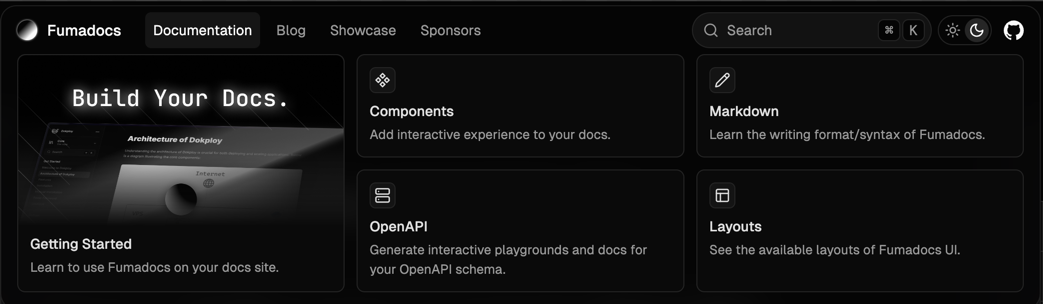
首页布局的导航菜单已重新设计,具有更好的动画效果和灵活性。
🌐 The navigation menu on Home layout is redesigned, with better animation and flexibility.
查看新 API。
🌐 See the new API.
链接样式
🌐 Link Styles
你可以通过 data-card 属性来取消 a 标签的 Tailwind CSS 排版样式。
🌐 You can escape Tailwind CSS Typography styles for the a tag with data-card attribute.
<a data-card="">
  No styles applied <code>But it does</code>
</a>
禁用主题切换
🌐 Disable Theme Switch
你可以在布局上使用 disableThemeSwitch 来禁用默认的主题切换器。
🌐 You can disable the default theme switcher with disableThemeSwitch on layouts.
重大更改
🌐 Breaking Changes
将 dir 选项从 defineDocs 移动
🌐 Move dir option from defineDocs
import { defineDocs } from 'fumadocs-mdx/config';

export const { docs, meta } = defineDocs({
  dir: 'my/content/dir', // define once
});
重构导入
🌐 Refactor Imports
上一个
import { DocsLayout } from 'fumadocs-ui/layout';
import { HomeLayout } from 'fumadocs-ui/home-layout';
import { HomeLayoutProps } from 'fumadocs-ui/home-layout';
新的导入路径
import { DocsLayout } from 'fumadocs-ui/layouts/docs';
import { HomeLayout } from 'fumadocs-ui/layouts/home';
import { BaseLayoutProps } from 'fumadocs-ui/layouts/shared';
Twoslash 用户界面
🌐 Twoslash UI
我们将 Twoslash UI 组件移到了 fumadocs-twoslash。这将部分逻辑从 Fumadocs UI 中隔离出来,从而实现更好的代码组织。
🌐 We moved Twoslash UI components to fumadocs-twoslash.
This isolates some logic from Fumadocs UI, allowing a better code organization.
以不同方式导入 CSS 样式和 Popup 组件。
🌐 Import the CSS styles and Popup component differently.
import 'fumadocs-twoslash/twoslash.css';

import { Popup } from 'fumadocs-twoslash/ui';移除已弃用的 API
🌐 Remove Deprecated APIs
之前的 createI18nSearchAPIExperimental 现在已重命名为 createI18nSearchAPI。
它使用 i18n 配置,而不是将选项分散到各处。
🌐 The previous createI18nSearchAPIExperimental is now renamed to createI18nSearchAPI.
It takes the i18n config instead of scattering the options everywhere.
fumadocs-core/search/shared 的类型已移到 fumadocs-core/server。
🌐 The types from fumadocs-core/search/shared is moved to fumadocs-core/server.